


KSAT Plus
3.02.00 Reviews
App Specs
- Version
- 4.5.217
- Updated On
- License
- Free
- Downloads
- 10,000+
- Developer
- Graham Media Group
- Categories
- News & Magazines
- Platform
- Android
Screenshots





 Analysis by AppCompare
When I reach for KSAT Plus, I’m usually looking for a quick way to follow what is happening around San Antonio without sorting through a national news feed first. That local focus is the app’s clearest reason to exist: it puts Graham Media Group’s KSAT coverage in one place, with news and video as the center of the experience. It is a free news and magazines app, and I’d consider it most useful for people who want a familiar local source close at hand rather than a broad collection of headlines from everywhere.
My first practical recommendation is to treat it as a companion to your regular news routine, not as a guarantee that every story or video will be ready at precisely the moment you open it. If a page or stream does not behave as expected, a calm check of your connection and a fresh launch are sensible first steps. That approach matters with any video-heavy news app: sometimes the delay is in the network or the stream, not in the story itself.
Getting Started with KSAT Plus
The app is free, developed by Graham Media Group, and aimed at a general audience with an Everyone 10+ content rating. It was released on May 4, 2018, and its current version is 4.5.217. Those details place it as an established local-news option rather than a one-purpose breaking-news utility. Its average rating is 3.0 from around ten ratings, with two written reviews, and it has over ten thousand installs. I would take that small pool of feedback as a limited signal, not a definitive verdict on how it will work on every phone.
Before relying on it during a busy morning, I’d install it when I have a few minutes to explore. Open the sections you expect to use, see how the app behaves on your connection, and check that the device can run it; the minimum operating system is 7.1. This small trial is more useful than waiting until a severe-weather alert or a major local story has made you impatient. If you use more than one device, make the same basic check on each rather than assuming the experience will be identical.
Interface and User Experience
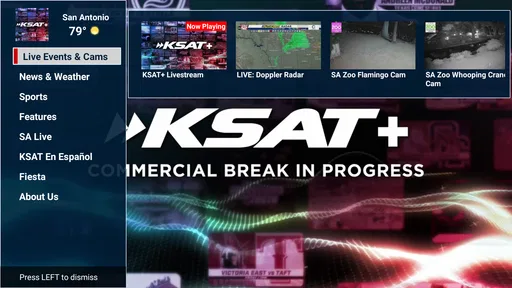
The moment you open the app, you’re greeted with a simple layout. The navigation is straightforward, with easy access to various sections like local news, weather updates, and live broadcasts. The developers have clearly put a lot of thought into making it user-friendly. I mean, who has time to fumble around with complicated menus, right?
What really stands out is the smoothness of the app. Switching between sections is seamless, and there’s no annoying lag. It’s like the app knows I’m impatient and takes care of business promptly!
Still, simple navigation only helps if you use it with a purpose. I find it more efficient to decide whether I’m checking headlines, weather, or a live report before opening the app, rather than tapping around and expecting one screen to answer every question. That habit makes a local-news app feel less like another stream to scroll and more like a quick reference point. It also helps when you are in a hurry: head directly to the item you care about, then leave once you have the information you need.
Worth Reading Before You Choose

EA SPORTS FC Mobile 26 Is a Bigger Football Game, but It Takes Time

Flipboard Shows What News Apps Must Do Beyond the Feed

Switching to Android Auto Means Rethinking Your Driving Routine

Google Calendar Makes a Crowded Week Easier to Manage

Ludo King Makes the Most of the Minutes Between Plans

Baby Panda World Brings Quick Play to Modern Phones, but Its Game Library Feels Busy
There is a trade-off in keeping a local app focused. A person who wants national politics, international reporting, business coverage, and local updates all mixed into a single personalized feed may find a large general-news app more convenient. I would not use KSAT as my only source for a broad view of the world. Its value is the local lens; the best way to judge it is to ask whether you want KSAT’s coverage within easy reach, not whether it can replace every publication you already read.
Content and Features
Now, let’s talk about content. KSAT Plus offers a variety of segments that cater to different interests. From breaking news alerts to in-depth feature stories, there’s a little something for everyone. And the best part? The content is consistently updated, so you’re always in the loop.
The live streaming feature is another highlight. Whether you’re interested in catching up on the latest news broadcast or want to watch special events, it’s all just a tap away. Plus, the video quality is top-notch, which makes the whole experience even better.
For everyday use, I’d separate quick checking from sitting down to watch. If I have only a minute, headlines and short visits are the sensible choice; a live broadcast is better when I can give it attention and have a stable connection. That distinction avoids a common frustration: opening a stream while walking out the door and expecting it to work like a short text update. When a story matters but time is tight, I’d first see whether there is a written report to scan, then return to video when I can watch without interruption.
A useful local-news workflow is to check the app at a couple of natural points in the day rather than repeatedly refreshing it. For example, I might look in the morning before commuting, then again later if a developing local event affects my plans. That gives the app a practical role without turning notifications or headlines into constant background noise. If you follow one particular story, returning to the relevant coverage directly is often more efficient than starting over from a broad feed and trying to rediscover it.
Compared with television, the app is more portable and lets you choose when to look; the television experience is easier when you want news playing in the background on a large screen. Compared with a radio bulletin, video can show the scene and visual context, while radio is often easier to keep on during a drive. Compared with national aggregators, this app is a better fit when local reporting is your priority, but an aggregator may be more useful when you want headlines from many regions and publishers in one place. None of those formats wins in every situation. I’d keep the one that suits the question I’m trying to answer.
One small but worthwhile tip is to distinguish a live event from a story you can read later. A live stream is especially useful when you want to follow a broadcast as it unfolds, but it asks more of your attention and connection. For a fact you need to check quickly, a written item may be the more practical route. Keeping that difference in mind helps avoid assuming that every update must be watched live to be useful.
Weather Updates
If you’re anything like me, then weather updates are crucial, and KSAT Plus doesn’t disappoint. The app provides detailed forecasts, and I love how it gives you alerts about severe weather conditions. It’s like having a mini weather station in your pocket. The notifications are timely, and you can customize them to suit your preferences.
For planning, I’d use a forecast as a prompt to think about the day, not as a promise that conditions will stay fixed. Weather can change, and a quick check before leaving is more useful than relying on something viewed hours earlier. If a notification appears at an inconvenient time, reviewing which alerts you actually want is a better response than turning every notification off in frustration. Keep the warnings that help you make decisions, and reduce the ones that do not fit your routine.
There is also a practical distinction between a local forecast and a detailed planning tool. If I only need to decide whether to carry an umbrella or reconsider an outdoor errand, a local update is convenient. If I need specialized information for a long trip, outdoor activity, or a location well beyond the area I follow, I’d check a dedicated weather service as well. That is not a knock on a local news app; it is simply choosing the right tool for the scale of the question.
Community Engagement
One thing I appreciate about this app is its focus on community engagement. User interaction is encouraged, whether it’s through comments on news stories or sharing content on social media. It feels like more than just a news app; it’s a platform where users can connect and share their thoughts.
When sharing a local story, I’d pause to check the headline and context before sending it along. A short alert can be useful, but a headline alone may not tell a friend why the story matters or whether it is still developing. Passing on the story itself rather than a fragment makes for a more helpful conversation, especially when the subject affects a neighborhood or a local event. I also treat comments as community perspectives, not as a substitute for the reporting: discussion can add context, but readers should distinguish opinion from confirmed details.
This social element will matter more to some readers than others. If you prefer to read quietly and avoid comment threads, you can still use the app for its news and video without making interaction the point of the visit. If you enjoy seeing how people respond to local coverage, the discussion can make a story feel connected to the place it concerns. The trade-off is that public reactions are not necessarily representative of everyone in the community, so I would not take a lively thread as a measure of wider opinion.
When Something Does Not Load
If a video stalls or a section seems slow, I would start with the basics rather than repeatedly tapping the same control. Check whether other apps can reach the internet, then try the story again after a short pause. If the connection is weak, move to a more reliable network if one is available. A live stream is more demanding than reading a headline, so a page that opens while video struggles does not automatically mean the entire app is broken.
If the app stops responding, close it and reopen it once. If the problem remains, restarting the device is a reasonable next check before reinstalling anything. On a phone that is low on available storage or running many tasks, freeing space or closing unused apps may also help with general performance. These are ordinary troubleshooting steps, not a promise that they will fix every issue; they simply separate a temporary device or connection problem from a persistent app problem.
When an issue happens only with one item, try another section before deciding that nothing works. A single stream or story may be temporarily unavailable while the rest of the app remains usable. Conversely, if several sections fail in the same way, that points toward a broader connection or app issue and is a reason to test again later. Keeping track of what failed—video, weather, or general navigation—makes it easier to describe the problem clearly if you seek help.
Notifications deserve the same careful approach. If an alert is missing, first check the phone’s notification settings and whether the app is allowed to send alerts. If alerts arrive too often, adjust the settings to keep only the ones you find useful rather than assuming that every notification is essential. The exact options can vary by device and app version, so I would use the controls available on the phone instead of expecting identical menus everywhere.
Who Will Get the Most From It
I’d recommend KSAT Plus to someone who lives in or follows the San Antonio area and wants local news, weather, and broadcasts gathered under one familiar outlet. It is particularly practical for a person who checks headlines before work, wants to follow a local event on video, or needs a quick weather reference before making plans. It also makes sense for someone who already knows KSAT’s coverage and wants a mobile way to keep up rather than relying only on a television schedule.
It is less compelling for a reader whose main goal is a deeply customizable, multi-source national feed, or for someone who wants specialist forecasts and tools for locations far from the local coverage area. People who rarely watch news video may also prefer a text-first news reader or a radio source that better suits how they consume information. I would not install it expecting it to replace every news and weather service; I’d choose it because local reporting is specifically what I want to check.
A realistic routine might look like this: before leaving home, I check the local forecast and scan for a headline that could affect the day. At lunch, I open a developing story if I want more context, and later I use a live broadcast when I have time to watch. If nothing relevant is happening, I close the app instead of scrolling just to fill time. That is the kind of measured use where a focused local app earns its place without demanding constant attention.
Wrapping It Up
In conclusion, KSAT Plus is a solid app for anyone wanting to stay updated with the latest news and weather forecasts. Its user-friendly interface, quality content, and reliable updates make it a must-have for news enthusiasts. Plus, the live streaming feature and community engagement aspects add a nice touch.
My more measured take is that its usefulness depends on whether local coverage is what you need. I like the idea of having a direct route to regional reporting and broadcasts, but I would not call it essential for every reader. The average rating of 3.0 suggests mixed experiences among a small group of raters, so I’d treat my own short trial as the deciding factor: install it, check the sections you care about, and see whether it fits naturally into your day. Since it is free, that trial does not require a purchase, though your time and attention still matter.
So, if you haven’t already, give it a try. I have a feeling you’ll enjoy the experience as much as I did. Happy browsing!
Pros
- User-friendly interface enhances navigation.
- Comprehensive weather updates in real-time.
- Customizable alerts for severe weather events.
- Interactive radar provides detailed visuals.
- Localized news coverage keeps you informed.
Cons
- Ads can be intrusive during use.
- Limited offline functionality limits access.
- Occasional app crashes disrupt experience.
- Some features require premium subscription.
- Weather data accuracy varies by location.
FAQs for KSAT Plus
What is KSAT Plus and what features does it offer?
KSAT Plus is a comprehensive weather and news app that provides users with real-time updates on weather conditions, forecasts, and breaking news. It features interactive radar maps, live streaming of local news, and personalized alerts. The app is designed to keep users informed about local and global events, making it an essential tool for staying updated.
Is KSAT Plus free to download and use?
Yes, KSAT Plus is free to download on both Android and iOS platforms. However, it may offer in-app purchases or subscriptions for additional features, such as ad-free experiences or premium content. Users can enjoy a wide range of free features initially and choose to upgrade if desired.
How accurate is the weather information provided by KSAT Plus?
KSAT Plus utilizes advanced meteorological data and algorithms to provide highly accurate weather forecasts and updates. It sources information from reliable weather stations and experts, ensuring users receive the most precise and timely weather conditions and alerts possible. Users can also customize notifications for specific weather events.
Does KSAT Plus offer personalized content or alerts?
Yes, KSAT Plus allows users to personalize their experience by setting preferences for weather alerts, news topics, and regions of interest. Users can customize notifications for severe weather alerts, breaking news, and other significant events, ensuring they receive tailored information relevant to their needs and locations.
What are the key advantages and disadvantages of using KSAT Plus?
One of the main advantages of KSAT Plus is its user-friendly interface and comprehensive features, including real-time weather updates and local news coverage. However, some users might find the presence of ads disruptive, unless they opt for a premium subscription. Overall, the app offers excellent value for those looking to stay informed.


